


VoxLog
4.4105.00 Reviews
App Specs
- Version
- 1.1.2
- Updated On
- License
- Free
- Downloads
- 1,000,000+
- Developer
- MOBİLEDO YAZILIM HİZMETLERİ
- Categories
- Parenting
- Platform
- Android
Screenshots
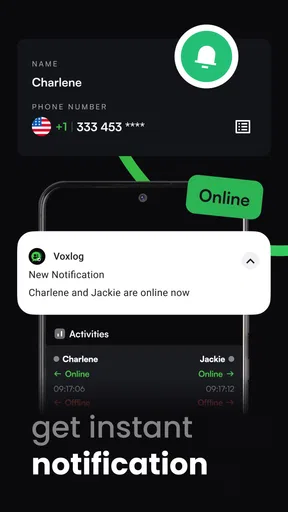
 Analysis by AppCompare
I would approach VoxLog with a specific question in mind: what does it actually let me understand or control about my digital presence? That matters more to me than a confident-sounding promise, especially for a parenting app that may intersect with family routines and personal information. The name is easy to associate with voice recording, but the app is categorized as parenting, so I would not assume it works like a standard recorder or rely on features that have not been clearly established.
That distinction is useful before deciding to install it. A parenting app should fit a real family need, not simply collect attention because it sounds convenient. I would first identify what I want to check, then see whether VoxLog’s screens and choices address that need in a way I can understand. If the purpose remains unclear, waiting is a reasonable decision; an app does not become useful just because it is available.
Start with the trust question
The practical trust test is not whether an app uses reassuring language. It is whether its purpose, requests, and user choices make sense together. I look for a clear explanation of what an action will do before taking it, and I avoid entering sensitive family details until I understand why they are needed. That is especially important when an app’s brief description gives little context about how it fits into parenting.
VoxLog is free to install, is rated for Everyone, and is published by MOBİLEDO YAZILIM HİZMETLERİ. Its 4.2 average comes from around 210,000 ratings, with over a million installs. Those figures can help show that people have tried it, but they do not tell me whether its practices fit my own privacy expectations or whether its main function suits my household. I would treat popularity as context, not proof of trustworthiness.
Look at choices before sharing anything
My rule for any family-oriented app is to pause at each request and ask whether it is necessary for the task I came to do. If VoxLog asks for access to something on the phone, I would read the prompt and consider what part of the experience would stop working if I declined. A permission request is not automatically a problem, but a request that feels disconnected from the feature I am using deserves a second look.
I would also check the account and privacy controls visible inside the app before adding information that could identify a child or another family member. It is sensible to use the least detail needed to try a service: for example, begin with a general test rather than names, schedules, or private notes. If the available controls do not make it clear how to change or remove what I have entered, I would hold off on making it part of a regular family routine.
Handle family information deliberately
Parenting often involves details that feel ordinary in the moment but become sensitive once they are stored: a child’s routine, a pickup arrangement, or a note about a difficult day. I would avoid putting that kind of information into any app until I understood where it goes and who can access it. This is not a claim about VoxLog’s data handling; it is a practical boundary I use when an app might become part of family life.
Worth Reading Before You Choose

Flipboard Shows What News Apps Must Do Beyond the Feed

Switching to Android Auto Means Rethinking Your Driving Routine

Google Calendar Makes a Crowded Week Easier to Manage

Ludo King Makes the Most of the Minutes Between Plans

Baby Panda World Brings Quick Play to Modern Phones, but Its Game Library Feels Busy

ESPN’s Live Game View Makes Following Close Games Easier
A low-risk way to evaluate the experience is to explore without entering real personal details, then decide whether its purpose and visible options are clear enough to justify more use. I would not treat a convenient screen or a familiar sign-in flow as a substitute for understanding the choices presented. If the app does not explain an action in plain language, there is no need to rush past it.
Who may find it worthwhile
VoxLog may be worth a careful look for a parent who has a specific reason to check their digital presence and is comfortable evaluating the app’s choices as they go. It is less compelling for someone who wants a clearly described, conventional parenting tool with an obvious day-to-day job from the first screen. If you are choosing an app for a child to use independently, I would be especially cautious about setting it up before you have reviewed what the child can see and do.
For a simple family calendar, shared reminders, or a basic note-taking need, I would compare VoxLog with tools already available on the phone and with established apps designed directly around that task. A dedicated alternative can be easier to assess because its purpose is more specific. VoxLog should earn a place in a family’s routine by solving a need those simpler options do not, rather than by asking the household to adapt around an unclear one.
A cautious verdict
The app is free to download, though optional in-app purchases range from about five to ten dollars per item. I would check what a purchase unlocks and whether it is a one-time choice before paying; there is no reason to spend money until the basic purpose is clear. Its current version is 1.1.2, and it runs on Android 8.0 or later, which makes the minimum system requirement straightforward to check before installation.
My recommendation is measured: explore VoxLog only if its purpose matches a real question you have about your digital presence, and make your decision based on the choices the app actually presents. The Everyone age rating is not a privacy assessment, and a strong rating average cannot replace one either. For family use, clarity matters more than novelty. If you cannot tell what information an action involves or how to stay in control, choose a more clearly explained alternative.
Alright, folks, let’s dive into the world of VoxLog, an app that promises to revolutionize the way we handle voice recordings. I’ve spent some quality time exploring its features, and I’m here to give you the scoop.
First Impressions
When you first fire up VoxLog, you’re greeted with a clean, intuitive interface that screams user-friendly. No clutter, no complicated menus – just straightforward functionality. It’s like the app is saying, “Let’s get to the good stuff right away!”
The home screen is all about simplicity. You have a big, bold button right in the center for starting a new recording, and all your previous recordings are listed below. Everything is neatly organized, making it easy to find what you need without any hassle. They really nailed the first impression here.
Recording and Editing Features
Now, let’s talk about the meat and potatoes – the recording features. The app allows you to record high-quality audio with just a tap. Whether you’re capturing a meeting, a lecture, or even your thoughts on the go, VoxLog has you covered. The recording quality is top-notch, and it doesn’t pick up too much background noise, which is a big plus in my book.
Editing is where VoxLog really shines. You can trim, split, and merge recordings with ease. The tools are incredibly intuitive – it’s almost like having a mini recording studio in your pocket. I found the editing process to be seamless and, dare I say, fun. The ability to add annotations and labels to specific parts of the recording is a game-changer for anyone who needs to keep track of key moments.
Organization and Storage
Keeping your recordings organized is a breeze with this app. You can categorize your files into folders, rename them, and even add tags for easy searching. It’s like having a digital filing cabinet that’s always with you.
And let’s not forget about storage. VoxLog offers cloud integration, allowing you to back up your recordings to services like Google Drive or Dropbox. This not only saves space on your device but also ensures that your important recordings are accessible from anywhere.
Sharing and Collaboration
If you’re working on a team project or need to share your recordings with others, VoxLog makes it super simple. You can share files directly from the app via email, messaging apps, or even a direct link. The app supports various file formats, so compatibility is never an issue.
One feature I absolutely love is the ability to collaborate. You can invite others to listen and make notes on your recordings, turning them into interactive documents. This is perfect for team meetings, interviews, or any situation where you need feedback from others.
Customization and Settings
Customization is another area where VoxLog does not disappoint. You can tweak the app settings to match your preferences, from changing the interface theme to setting up recording notifications. The app also supports multiple languages, which is a nice touch for non-English speakers.
Security-wise, the app offers password protection for your recordings, adding an extra layer of privacy. This feature is especially useful if you’re dealing with sensitive information.
Final Thoughts
After spending quality time with VoxLog, I can confidently say it’s a must-have for anyone who regularly deals with audio recordings. It’s packed with features that cater to both casual users and professionals, and the user-friendly design makes it accessible to everyone.
Whether you’re a student, journalist, or just someone who likes to keep voice memos, VoxLog offers everything you need to capture, edit, and manage your recordings efficiently. So, if you’re in the market for a reliable voice recording app, give VoxLog a try. It might just become your new best friend in the digital world!
Pros
- User-friendly interface for easy navigation.
- Extensive library of audio samples available.
- Seamless integration with popular DAWs.
- High-quality sound output and editing tools.
- Regular updates with new features and fixes.
Cons
- Limited free version features available.
- Occasional lag on older devices.
- Requires internet for full functionality.
- Steep learning curve for beginners.
- In-app purchases can be expensive.
FAQs for VoxLog
What is VoxLog and what main features does it offer?
VoxLog is a versatile voice recording app designed for both personal and professional use. It offers high-quality audio recording, easy editing tools, and cloud integration for storage. You can categorize recordings, add notes, and share them easily across platforms. The app also supports background recording, making it ideal for capturing lectures, meetings, or spontaneous ideas.
Is VoxLog available on both Android and iOS platforms?
Yes, VoxLog is available for download on both Android and iOS platforms. Users can find it on the Google Play Store and the Apple App Store. The app is optimized to work smoothly across various devices, ensuring a consistent user experience regardless of your operating system.
Are there any in-app purchases or subscription fees in VoxLog?
VoxLog offers a free version with basic features. However, to unlock advanced functionalities like extended recording time, advanced editing tools, and additional cloud storage, users can opt for in-app purchases or a subscription plan. This flexibility allows users to choose a plan that best fits their needs and budget.
How secure is my data with VoxLog, and is there cloud backup available?
VoxLog prioritizes user data security by employing encryption and secure cloud storage options. Users can back up their recordings to the cloud, ensuring they are not lost even if the device is damaged or lost. The app also offers multi-factor authentication for added security, giving users peace of mind.
Can I use VoxLog for professional purposes, such as interviews or podcasts?
Absolutely, VoxLog is designed to cater to both casual and professional needs. Its high-quality audio recording capabilities and editing tools make it suitable for interviews, podcasts, and more. Additionally, the app's sharing features allow users to distribute their recordings easily, making it a valuable tool for content creators.


